-
·
3 Steps to Turn Off Driving Mode on Android Phones
Driving mode is a useful feature on Android phones that aims to reduce distractions when driving. It automatically turns on when your phone detects you are in a moving vehicle, and it blocks notifications and calls to keep your attention on the road. However, sometimes you may want to manually turn off driving mode, whether…
-

·
6 Steps to Update WhatsApp without Play Store
WhatsApp is one of the most popular messaging apps, used by over 2 billion people worldwide. Keeping WhatsApp updated is important to get the latest features and security fixes. Typically, WhatsApp updates automatically from the Play Store on Android devices. However, sometimes updates don’t come through or you may prefer to update WhatsApp manually. Here…
-

·
6 Steps to Limit Screen Time on Android
Excessive screen time has become an issue in the modern digital era. While smartphones and tablets provide useful functionality, spending too much time staring at screens can negatively impact mental and physical health. Limiting screen time is important for both adults and children. When used responsibly, Android devices can enrich our lives. However, it’s all…
-

·
2 Steps to View Sold Items on Facebook Marketplace
Facebook Marketplace is an increasingly popular platform for individuals to buy and sell locally. With over 1 billion monthly active users on Facebook, Marketplace gives sellers access to a huge audience of potential buyers right in their area. Once an item sells on Marketplace, the listing is automatically marked as sold and removed from public…
-

·
4 Steps to Hide Apps on Android Without Disabling
In the digital age, privacy is paramount. One aspect of this is the ability to hide apps on your Android device. While disabling apps is a common method, it’s not always the most convenient or desirable option. Disabling an app not only hides it but also prevents it from functioning, which isn’t ideal if you…
-

·
5 Steps to Change Instagram Username on Android
Instagram has become one of the most popular social media platforms, with over 1 billion monthly active users. With so many people using Instagram, finding a unique username that hasn’t already been taken can be difficult. Fortunately, Instagram allows you to change your username in case your current one is no longer suitable or available.…
-

·
6 Steps to Play Snake on Google Chrome
The classic game Snake has been entertaining people for decades. The simple yet addictive gameplay involves maneuvering a snake around the screen to eat food pellets while avoiding obstacles and walls. While Snake rose to popularity on old Nokia mobile phones, you can now play it right in your web browser thanks to Google Chrome’s…
-
·
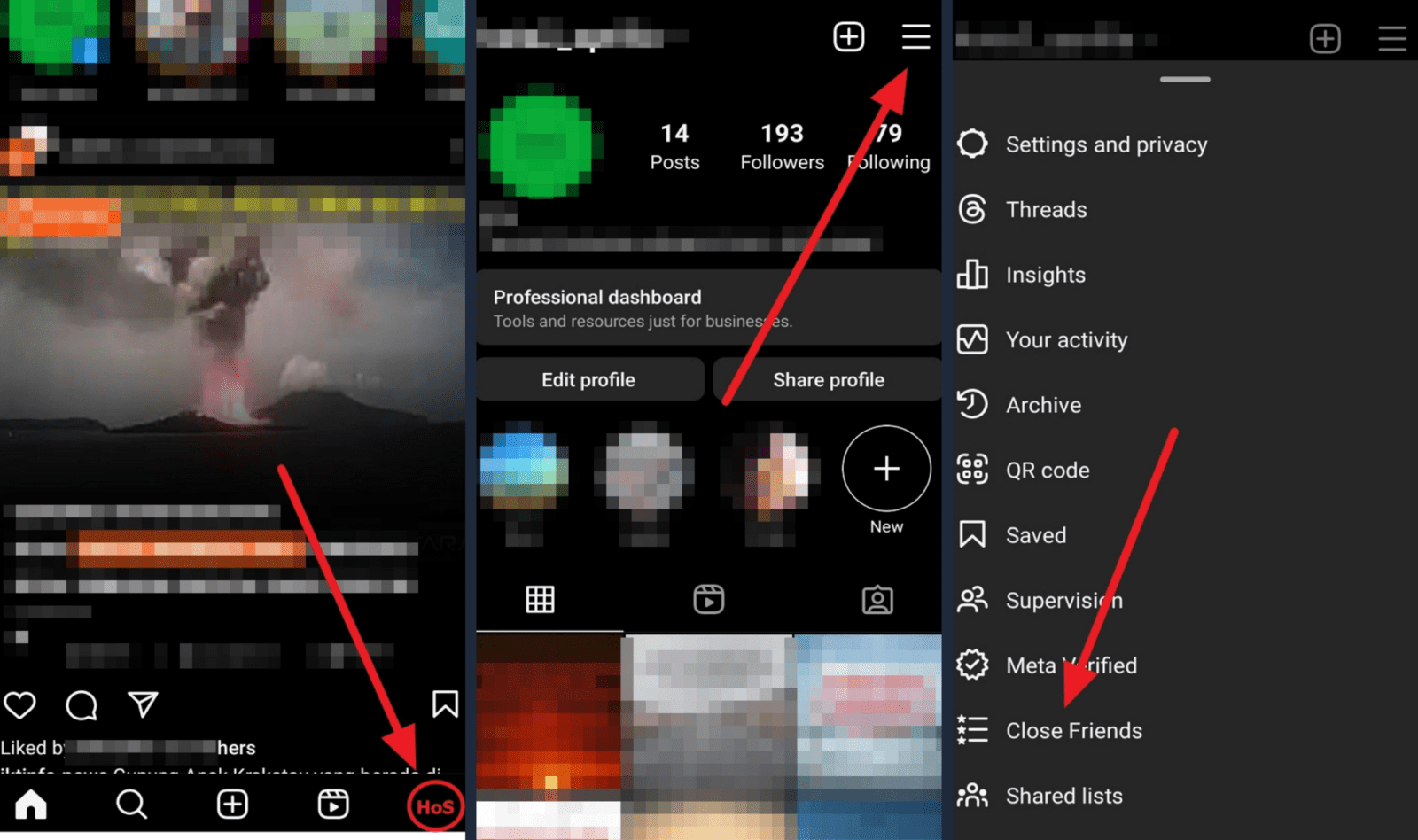
6 Steps to Add Close Friends on Instagram for Android
The Close Friends feature on Instagram allows you to share Stories and posts with a selected group of followers, rather than your entire followers list. This helps you share more personal content with your inner circle without worrying about who might see it. Adding a Close Friends list on Instagram for Android is easy. In…
-
·
8 Steps to Change the Group Icon in WhatsApp for Android
WhatsApp groups are a great way to stay connected with friends, family, coworkers, and more. When you create a WhatsApp group, you have the option to customize it by adding a group icon and description. The group icon helps identify the group and adds a bit of personalization. If you want to update the look…
-

·
6 Steps to Enable Dark Mode in Google Maps
Using Google Maps in dark mode can make the app easier on your eyes, especially when using it at night or in dark environments. The dark color scheme reduces glare and strain, allowing you to navigate more comfortably. Fortunately, enabling dark mode in the Google Maps app for Android is simple. Here are the key…