
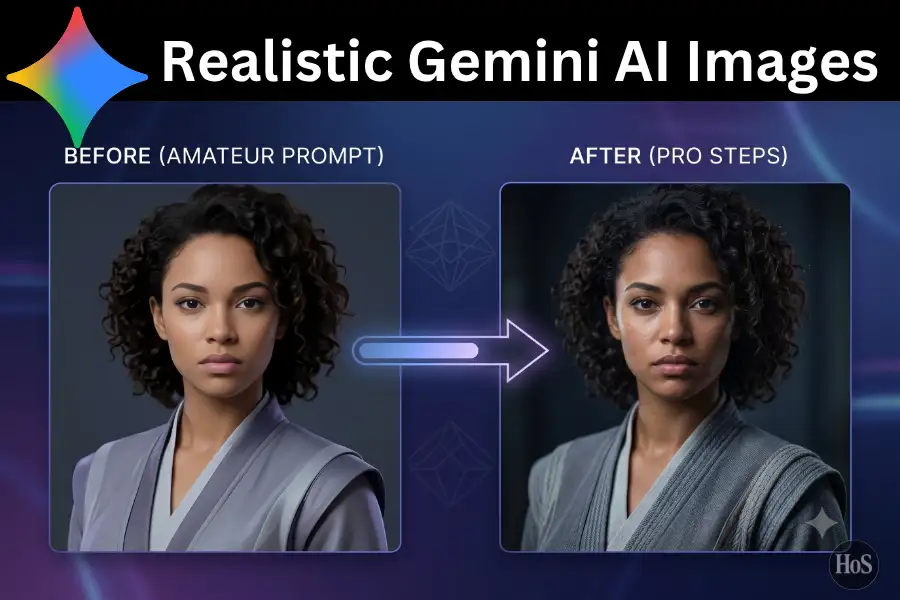
Creating realistic images with Gemini AI sounds easy in theory, but in practice your results can jump from stunning to super weird really fast 😅 If you just type something basic like “a man in an office,” you usually get flat lighting, off proportions, and those little uncanny valley vibes. In this guide I will walk you through how I actually think about prompts, camera, and lighting so Gemini gives you images that look like real photos, not random AI art.
I am focusing on photo realistic results using Gemini’s image models, especially when you want stuff like portraits, product shots, lifestyle photos, or cinematic scenes. You will see how to describe the subject, control the light, talk to it like a camera, and then refine in a few quick iterations instead of spamming new prompts forever. By the end, you will basically have a simple mental checklist every time you want Gemini to spit out something that looks like a real photo, not a cheap filter.
Gemini is actually very capable at realistic images if you give it the right kind of detail. Official docs mention that you need to be specific, explain context, and use things like photographic terms and aspect ratio to guide the model instead of leaving everything to chance. They also recommend you iterate and refine instead of expecting the first image to be perfect, which lines up with how real photographers work too.
How Gemini AI Thinks About Realistic Images
When you ask Gemini to generate an image, it is not just drawing from scratch, it is trying to understand your intent, the scene, and the style from your text. Google’s own best practice docs say the more specific you are about subject, context, and style, the more control you have over the final image, especially for realism.
They also suggest that you phrase your request like “create an image of” or “generate an image of” so the model clearly knows you want a picture, not a text answer. If you just throw in a short phrase with no context, Gemini can default to something generic or even respond in text if it is not sure what you want visually.
Another big factor for realism is composition and camera language, not just objects in the frame. Official guidance highlights using terms like wide angle shot, macro shot, low angle perspective, and defining aspect ratio like 1:1 or 16:9 so the model behaves more like a camera.
How To Talk In “Photo Language” So Gemini Stops Giving You Fake Looking Results
If you want photo realistic images, you need to start talking to Gemini the way photographers talk about shots. That means focusing on three things in your prompt subject, lighting, and camera plus some texture and environment to ground it in reality.
For subject, the docs recommend being very specific with details instead of vague categories. Think “a young woman in a red dress running through a park” instead of just “a woman in a dress” which gives Gemini much more to anchor on.
Lighting is a huge realism switch, and Google’s own guides tell you to think about the overall feel of the scene. So you can say things like soft window light, golden hour, or harsh midday sun which completely changes whether the image looks like a snapshot or a movie still.
Then you add camera talk to push it toward real world optics. Users and official guides both mention framing, close up vs wide shot, portrait vs landscape, shallow depth of field, and resolution like 4K to make it act more like a physical lens.
Steps To Prompt Gemini AI For Photo Real Images Every Time
- Start with “create an image of” plus your main subject and action in one clear sentence
- Add specific physical details age, clothing, mood, and environment so the subject feels human and grounded
- Define the setting in real world terms such as a studio, apartment, street, or café at a clear time of day
- Choose lighting like golden hour, soft window light, or cinematic low light to match the mood you want
- Set the camera framing for example close up portrait, chest up, wide angle street scene, or macro detail
- Mention depth of field like shallow background blur or everything in crisp focus for landscape style shots
- Pick an aspect ratio 1:1 for profile pics, 9:16 for vertical posts, or 16:9 for cinematic scenes
- Ask for high quality output with phrases like ultra realistic, 4K quality photo, and natural skin texture
- If the first result is off, refine with follow ups like make the lighting warmer or move the camera further back
- Once you like the base image, do small edits change background, adjust colors, or tweak facial expression instead of fully regenerating
Using Composition Lighting And Texture To Make Gemini Images Feel Like Real Photos
Realistic AI images live or die in the details you mention about composition, lighting, and texture. Google’s prompt guides say you should think about where every element sits in the frame, what angle you are “shooting” from, and what kind of visual style you want before you even start typing.
Composition is basically where the subject sits in the shot and how much space you give them. You can ask for framed from the chest up with headroom if you want a professional headshot or tiny figure in a wide desert landscape if you want something cinematic and distant.
Lighting controls mood and realism more than people realize. Their examples highlight using scenarios like misty forest at dawn or sunlit studio which automatically pushes the model toward believable contrast, shadows, and color.
Texture is what makes skin, fabric, metal, and hair feel real instead of plastic. In their own image guides, they emphasize very detailed descriptions like etched patterns, glistening dew, or visible grain, which you can translate into phrases like natural skin texture, soft hair strands, or detailed fabric fibers.
You can also ask explicitly for multiple variations so you do not get stuck on one version. Google suggests prompting for several distinct variations or color palettes, which is perfect when you are testing what looks most natural.
Conclusion
If you treat Gemini like a camera operator instead of a magic art button, your results instantly start looking more realistic. You give it a subject, scene, light, and lens, then nudge it with small edits instead of starting over every time.
As you practice, you will build your own favorite phrases for portraits, products, and scenes that always hit. Once that happens, Gemini basically turns into your on demand photo studio, and you can create consistent realistic images way faster than traditional shoots.
FAQs
How do I stop Gemini from making weird faces
Focus on clear subject details, studio or natural lighting, and ask for a specific framing like chest up portrait with natural expression and realistic skin texture.
What is the best aspect ratio for realistic portraits
Use 1:1 or 4:5 with a close up or chest up composition and shallow depth of field so it feels like a real camera shot.
Why do my images still look like illustrations not photos
You are probably missing camera and lighting language, so add things like shot on DSLR, natural window light, and realistic colors instead of stylized.
Can I edit an image instead of starting from scratch
Yes, you can upload an image and tell Gemini to change the background, adjust lighting, or tweak details while keeping the main subject the same.
How detailed should my prompt be for realism
More is better, as long as it is clear focus on subject, environment, lighting, camera framing, and texture instead of one short vague line.
Leave a Reply